
AS2 can provide a strong security foundation for B2B document exchange when it is correctly configured and operated. Its core controls are message encryption, digital signatures, trading-partner certificates, and MDN receipts. But security is never a protocol setting alone: certificate lifecycle, access control, monitoring, and incident response determine whether the connection stays trustworthy in production.
The four layers of AS2 security
Confidentiality through encryption
An AS2 sender can encrypt a document using the recipient’s public certificate. Only the holder of the matching private key can decrypt it. This protects the message content even if the transmission is exposed outside the intended workflow.
Integrity and origin through digital signatures
The sender signs the message using its private key. The receiver verifies that signature with the sender’s public certificate. A valid verification indicates that the message was not altered after signing and ties it to the certificate owner.
Receipt evidence through MDNs
An MDN reports how the recipient handled the AS2 message. When the MDN is signed, the sender can validate it against the partner certificate and retain it with the original transaction. See synchronous vs asynchronous MDN for the operational distinction.
Transport and access controls
AS2 commonly uses HTTP or HTTPS for transfer, but transport security must be paired with correct endpoint exposure, authentication where required, IP restrictions, secure key storage, and least-privilege user access. The AS2 protocol specifies the B2B message behavior; your deployment should add appropriate platform and network controls.
Why AS2 encrypts the payload as well as the channel
The two encryption layers in an AS2 exchange are independent. TLS protects the connection to the partner’s endpoint and ends where that connection is terminated — at a load balancer, a reverse proxy or a WAF, which then handles the request in the clear. S/MIME encryption is applied to the payload before the POST, so those hops only ever carry ciphertext that the recipient’s private key can open.
Payload encryption also outlives the transfer: a message sitting in a queue or a backup is still encrypted, while a TLS session leaves nothing behind once it closes. The signature is bound to the bytes, so it can be re-verified from the archive later.
This is why AS2 security does not rest on the transport. RFC 4130 allows plain HTTP, and a message sent that way is still encrypted and signed. Use HTTPS regardless: the headers carrying AS2-From, AS2-To, Message-ID and Subject travel outside the encrypted payload, and partner implementation guides ask for it.
AS2 security policy: which algorithms to require and which to retire
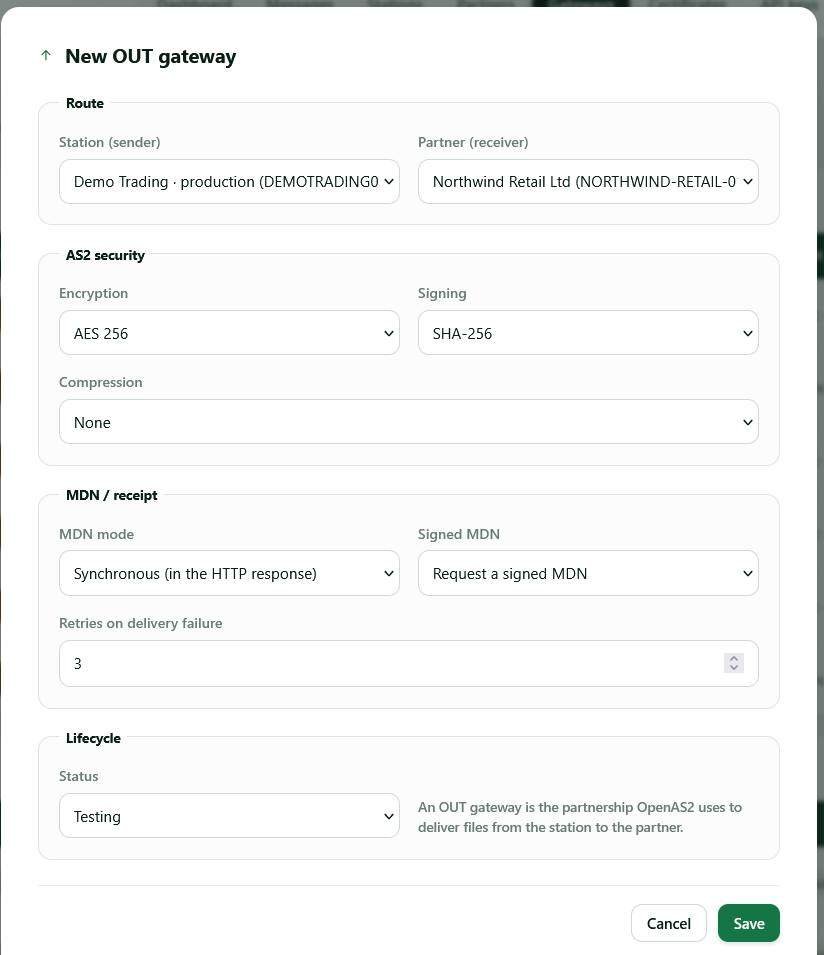
Require AES for encryption, SHA-256 for signing and RSA keys of at least 2048 bits, then confirm what each partner supports before go-live. Algorithms in AS2 are agreed bilaterally, not imposed by the protocol, so your AS2 security is only as strong as the weakest partner profile you accept.
| Setting | Require | Retire | Why it matters |
|---|---|---|---|
| Payload encryption | AES-256, or AES-128 where the partner caps it | 3DES | 3DES is legacy and being withdrawn, while AES is widely supported. |
| Signing and MIC hash | SHA-256 | SHA-1, MD5 | The MIC in a signed MDN is a hash of the message; your evidence is only as strong as that hash. |
| Key type and size | RSA 2048 minimum, 4096 where both sides support it | RSA 1024 | Size the key for the end of a multi-year validity window. |
| MDN | Signed MDN requested on every outbound message | Unsigned MDN | An unsigned receipt cannot be attributed to the partner’s key, so it proves nothing. |
| Unsigned inbound messages | Reject | Accepting whatever arrives | Accepting unsigned messages loses origin evidence for that partner. |
| Certificate trust | Fingerprint confirmed over a second channel before import | Importing a certificate straight from an inbound email | Trust comes from the import decision, not from a CA chain. |
| Transport | HTTPS, plus IP allow-listing where the partner offers it | Plain HTTP endpoints | Headers and routing metadata sit outside the S/MIME envelope. |
One partner limited to older settings does not drag the rest down, so record the agreed values in each partner profile: “we think they are on SHA-256” is not something to discover during an incident.
What AS2 security does not cover
AS2 does not validate the business correctness of an EDI invoice, prevent a legitimate user from uploading the wrong file, or ensure that a downstream ERP processed a document. It also cannot protect a private key that has been mishandled. Build controls around the protocol: approval workflows, EDI validation, audit access, alerting, retention policy, and incident runbooks.
Most real incidents fall just outside that boundary:
- A compromised endpoint — a valid signature proves the private key was used, not that the right person used it, so anything sent from a compromised system is signed correctly.
- The right partner, the wrong recipient inside it — an AS2 identifier addresses an organization’s station, not a department or a person. Routing after the file lands is internal to the partner.
- Data at rest after decryption — the S/MIME envelope is gone the moment the message is decrypted. From there the file is protected by your storage and your ERP, not by AS2.
- Who may submit a file — the station signs and sends whatever your systems hand it. Authorization over what enters the outbound queue is an application control.
- Whether the document was accepted — an MDN reports that the bytes arrived, decrypted and verified, and business acceptance is reported separately by the partner’s application.
That is not an argument against AS2. It is why the evidence it produces — signed messages, signed MDNs, a searchable log — has to be paired with controls on either side, the same set an auditor asks for when reviewing your AS2 audit trail.
Practical AS2 security checklist
- Exchange public certificates through a verified channel and record their fingerprints.
- Protect private keys and limit administrator access.
- Configure signing, encryption, and MDN policy per partner.
- Track expiry dates and coordinate certificate rotation early.
- Keep message and MDN audit records for an agreed retention period.
- Alert on signature failures, decryption failures, repeated retries, and missing MDNs.
- Review partner profiles after endpoint, certificate, or personnel changes.
The certificate item deserves special attention: AS2 certificate expiration can interrupt an otherwise healthy connection without warning if it is not actively monitored.
Where does the private key live? Questions for a managed AS2 provider
If someone else runs your station, the AS2 security question that outranks the rest is where the private key is generated and who can use it. Ask it directly, in writing:
- Where is the key pair generated, and does the private key ever leave the platform — by email, export or support ticket?
- Does each customer get its own AS2 identifier, certificate and endpoint, or do several organizations share one identity?
- Are the identifier and the certificate yours to take elsewhere without re-onboarding every partner?
- Who on the provider side can see a decrypted payload, in what circumstances, and is that access recorded?
- Where is the service operated, and how long do messages and MDNs stay searchable rather than merely backed up?
For AS2Connection: the certificate is generated server-side and the private key never leaves the platform, each station has its own identifier, certificate and HTTPS endpoint, and the service runs in the EU. The retention period for messages and MDNs is stated on the pricing page, and taking an identifier and certificate elsewhere is one of the points to compare when weighing a cloud AS2 gateway against an on-premise one. A provider that cannot answer these questions plainly is asking for trust it has not evidenced.
Who can add a partner or change a gateway?
Configuration changes are the part of AS2 security teams forget to control. Adding a partner creates a trust relationship, importing a certificate decides whose signatures you accept, and switching a gateway to “accept unsigned” weakens a connection in one form field, and each of those looks like a routine edit in the console.
Keep the administrator list short and give everyone else read access to the message log, which is what most people need. Make sure the platform records who changed a partner, a gateway or a certificate and when, so a failure that follows a change can be traced to it.
Secure operations with a managed gateway
A managed gateway does not transfer accountability away from your business, but it can centralize partner profiles, certificate visibility, message status, and operational audit trails. That makes it easier to apply a repeatable security process across partners instead of rebuilding the same controls for every connection.
Frequently asked questions
Is AS2 secure enough for invoices and payment documents?
Yes, for the transport itself. The payload is encrypted to the recipient’s certificate, signed with the sender’s key, and acknowledged by a signed MDN. What it cannot do is confirm the invoice is right, so keep document validation on your side.
Are self-signed AS2 certificates less secure than CA-issued ones?
Not in AS2’s trust model, where the trust decision is the partner importing your certificate after checking its fingerprint rather than a chain back to a public authority. Key size and signing algorithm matter more than the issuer here; AS2 certificates explained covers why self-signed is the normal case and when a partner will ask for a CA-issued certificate instead.
Does a signed MDN prove my partner accepted the document?
No. A positive MDN is transport evidence: the message arrived, decrypted and verified, and an order can be received perfectly and still be rejected an hour later. What a signed receipt proves, and how far it goes as non-repudiation of receipt, is set out in what an AS2 MDN does and does not prove.
What should I do if a partner still requires 3DES or SHA-1?
Accept it for that partner and that direction only, since crypto settings are configured per partner and per direction. Record the exception with who approved it and a date to revisit, and ask their technical contact when the platform will support AES and SHA-256. Keep every other connection at the stronger settings.
If you need an AS2 connection service for partner document exchange, AS2Connection provides the managed gateway layer. Start with the partner onboarding checklist to ensure the technical and operational controls are agreed before go-live.

Leave a Reply