
Manual EDI delivery creates avoidable risk: files are attached to emails, copied to folders, resent without records, and checked only after a partner complains. An AS2 SaaS platform can automate the transport portion of document exchange, applying the right security and partner rules every time a business system produces a file.
A practical automation pattern
Your ERP, warehouse, TMS, integration platform, or EDI translator creates an outbound document. It delivers that file to the AS2 gateway through an API, secure file drop, or other agreed integration method. The gateway selects the trading-partner profile, applies signing and encryption, transmits the AS2 message, tracks retries, and records the MDN.
Inbound documents follow the reverse path: the gateway validates and decrypts the AS2 message, records the receipt state, and makes the payload available to the downstream EDI or ERP process. The downstream process may then validate syntax, transform content, and trigger a business workflow.
Pull or push: how files cross into your systems
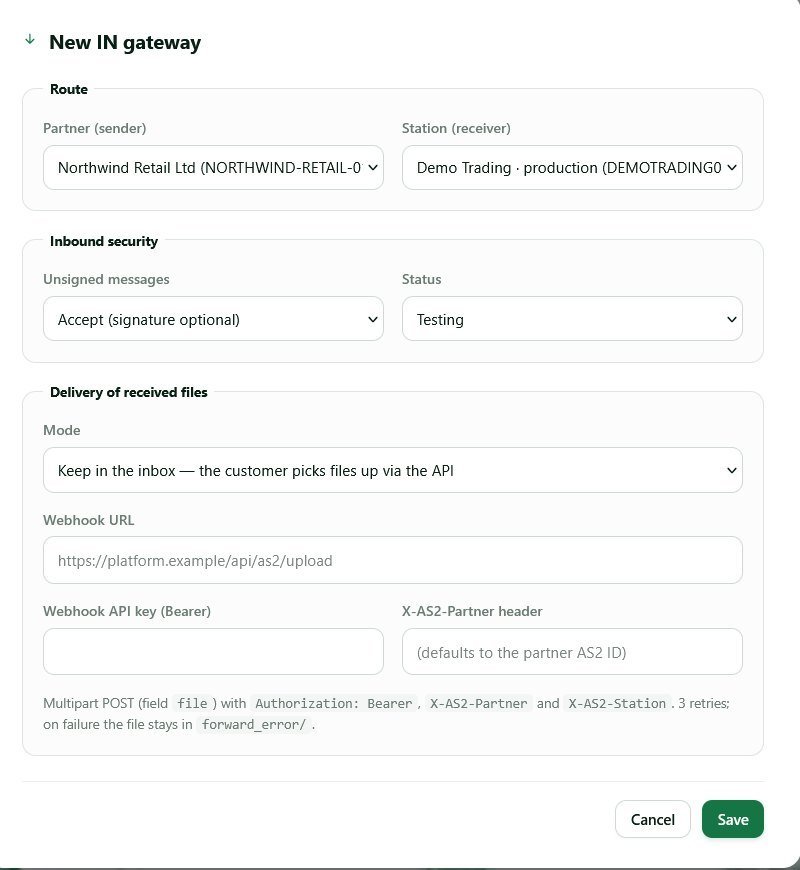
After the AS2 exchange succeeds, the file still has one boundary to cross: from the gateway into the application that acts on it. How you cross it shapes everything else about the way you automate EDI. In a pull pattern the file waits in an inbox endpoint and your system polls, fetches and acknowledges each file it takes. In a push pattern the platform POSTs each file to a webhook you expose, with a bearer token and headers naming the partner and the station it arrived on.
Pull suits systems that already run on a schedule and needs no public endpoint on your side, which removes a firewall conversation. Its failure mode is silence: if the poller stops, files accumulate quietly, because as far as AS2 is concerned delivery succeeded and the MDN went back hours ago.
Push cuts latency to seconds, which matters when a warehouse is waiting on the order. The cost is that your endpoint joins the delivery path: reachable over HTTPS, quick to respond, holding a bearer token that needs rotating. When it does not answer, the platform retries a bounded number of times and leaves the file in the inbox, so a deployment window loses nothing.
| Question | Pull (API pick-up) | Push (webhook) |
|---|---|---|
| Who initiates | Your system, on its own schedule | The platform, as soon as the message is verified |
| What you expose | Nothing inbound; you make outbound calls | An HTTPS endpoint that accepts POSTs |
| Latency | Up to one polling interval | Seconds |
| When your side is down | Files wait in the inbox | Retries, then the file waits in the inbox |
| Backlog shows up as | Unacknowledged files climbing | Failed deliveries and unacknowledged files |
| Best fit | Batch ERPs and translators with their own queue | Order and shipment flows that must move now |
They are not exclusive. The steadiest arrangement runs push for normal traffic plus a scheduled sweep of the inbox, which doubles as a reconciliation check: if the sweep finds anything, your endpoint dropped a file and you know it before the partner calls.
Automate the right boundaries
Automation should reduce repetitive transport work without hiding exceptions. Keep partner-specific AS2 settings—certificates, endpoint, AS2 IDs, MDN policy, retries—in the gateway. Keep business rules—such as whether an order can be released—in the ERP, EDI translator, or workflow system. This separation makes changes easier to review and test.
The AS2 integration with ERP systems guide expands on these boundaries.
What should stay manual when you automate EDI
A few steps should keep a person in them: the ones where a wrong automated decision is expensive to reverse. Everything else — sending, receiving, retrying, logging, alerting — is repetitive work a machine does better at 6 a.m.
- Activating a new partner. Someone compares the AS2 identifier, URL and certificate fingerprint against what the partner sent out of band, and confirms the test message was read.
- Approving a certificate rotation. Generating a key pair is automatic; choosing the switchover day is not, because the partner has to import the new certificate first. Certificate expiration is the classic cause of a working connection failing overnight.
- Anything that changes a business rule. Suppressing a document type, or changing which entity sends under which identifier, is a business decision that merely looks like configuration.
- The first live document of a new type. A working
ORDERSflow says nothing about theINVOICflow you enable next month. Watch the first one through to the partner’s acknowledgment, then let it run.
Required controls for reliable automation
- Unique message correlation IDs from the source system through AS2 delivery.
- Idempotency or duplicate-handling rules before any automatic resend.
- Clear retry policy for temporary endpoint problems.
- Alerting for failed sends, missing MDNs, and unprocessed inbound documents.
- Visibility into the original payload, transmission, receipt, and business acknowledgment.
- Certificate-expiry and partner-change management.
Do not automate a blind retry loop for invoices or orders. A network failure does not always mean the partner did not receive the original file. Use the MDN and message history to decide whether a resend is appropriate. See AS2 connection troubleshooting for a disciplined diagnostic process.
Acknowledgments, duplicates and poison messages
Three failure modes turn a healthy EDI automation into a support case: a file nobody picked up, an order processed twice, and a file your system keeps rejecting.
Why acknowledging a pick-up matters
An acknowledgment tells the platform you have taken responsibility for the file. Until it arrives, the file stays in the inbox and is offered again on the next poll, which stops a crash halfway through an import from swallowing a purchase order. The rule that follows is easy to get wrong: acknowledge after the payload is durably stored, never on receiving the HTTP response. Acknowledge first and a restart two seconds later loses a document both sides believe was delivered.
A file that is never acknowledged does not disappear, but it does not process either — which is why an inbox counter that only climbs is a better alarm than any log line.
How to avoid processing the same order twice
Duplicate protection belongs on both sides of the boundary, because the layers catch different things. At the transport layer, a gateway can detect duplicates by Message-ID, so a partner’s replayed transmission is recognized as the same message — a check most gateways implement, though it is a convention rather than a protocol requirement.
That alone is not enough. A partner who resends the same purchase order in a new AS2 message produces a new Message-ID and a perfectly legitimate delivery, and your import creates a second sales order. The defense is a business idempotency key — the interchange control number, or the document number inside the payload — checked before you post anything. Store the Message-ID next to it so support can tie a business record back to one transmission.
Where a poison message ends up
A poison message is a file your endpoint rejects every time: an encoding your parser chokes on, an item code that breaks a constraint, a document type nobody enabled. Retrying it forever fixes nothing, so a bounded retry count matters more here than anywhere else. When the retries run out, the file must stay visible and unacknowledged rather than be discarded, and someone has to be told. A file deleted after five failures is a document your partner holds receipt evidence for and you cannot produce.
Start with one high-value document flow
Choose a document that has a clear source, destination, owner, and success signal—such as an outbound purchase-order acknowledgment or inbound invoice. Map the current process, configure the partner in a test environment, validate AS2 delivery and downstream processing separately, and define the exception runbook. Once that flow is stable, reuse the pattern for other partners and documents.
Decide what finished looks like before you start, because “a message was sent” is not a finish line. Four criteria are enough:
- A document created in the source system reaches the partner without anyone opening a file.
- Every transmission has a signed MDN against it, and one still missing after an agreed window alerts a named owner — that window depends on whether the partner returns MDNs synchronously or asynchronously.
- Inbound files are acknowledged only after storage, and any backlog is visible on a screen someone looks at.
- A colleague who did not build the flow can follow the runbook and resolve a failed send.
Frequently asked questions
What happens to inbound EDI files while my system is down?
They wait in the inbox, unacknowledged. The AS2 exchange completed independently of your application, so the partner holds a valid MDN and considers the document delivered. Your system works through the backlog when it returns. What matters is that the backlog stays visible, so a two-hour outage does not become a two-day discovery.
Is an MDN proof that my partner processed the document?
No. An MDN is transport evidence: the bytes arrived, decrypted and verified against your signature. Business acceptance comes back separately, as an EDIFACT CONTRL or an X12 997, and a missing one deserves an alert of its own — AS2 for EDI compliance sets out what each layer of evidence proves.
Do I still need an EDI translator if transport is automated?
Yes, in some form. Something has to turn your ERP’s data into the partner’s format: a translator, a mapping service, or code in your middleware. AS2 carries whatever payload you hand it and never inspects it, as the AS2 protocol guide describes. Automating transport does not remove mapping work; it stops mapping problems from looking like delivery problems.
How much volume do I need before it pays to automate EDI?
Volume is rarely the trigger. The trigger is a partner that mandates AS2, or a manual step that has already caused a late delivery or a disputed invoice. A few hundred messages a month handled by hand costs more in rework than it looks like, and an AS2 SaaS platform is priced monthly by volume — see the pricing page.
AS2Connection provides a managed AS2 connection layer that can be integrated into these automated workflows. Begin with how to set up an AS2 connection, then build transaction monitoring before scaling volume.

Leave a Reply