
AS2 monitoring should answer one operational question quickly: what happened to this document, and what must we do next? A green infrastructure dashboard is not enough. B2B teams need visibility from the point an ERP releases a file through AS2 delivery, MDN receipt, EDI validation, and business processing.
Model the message lifecycle
Define clear, non-overlapping states. A useful baseline is: file accepted from source; AS2 message built; transmission attempted; remote transport response received; MDN received and validated; document delivered to downstream process; EDI or application acknowledgment received; exception closed. Record timestamps and an immutable correlation ID at every state.
This model prevents a common mistake: telling a business user that a document was “delivered” when the gateway merely accepted it from the ERP. The AS2 protocol guide explains why the MDN is a distinct confirmation.
AS2 monitoring by message state: the question each state answers
A state is only worth recording if someone can act on it. The test for any AS2 monitoring view is whether a person looking at a stuck message knows, without asking anyone, which side of the connection to investigate and what to do next.
| State | Question it answers | Action it should trigger |
|---|---|---|
| Queued past its threshold | Did the message ever leave our gateway? | Look at your own side only. Nothing on the partner side can explain this. |
| Transmission failed, no HTTP response | Can we reach the partner’s endpoint at all? | Endpoint, firewall and allow-list checks. Let retries run, then alert on retry exhaustion. |
| Sent, MDN pending beyond the agreed window | Did the partner’s gateway acknowledge receipt? | Check your inbound endpoint for asynchronous receipts first, then contact the partner with the Message-ID. |
| Negative MDN | Was the message rejected at the AS2 layer, and why? | Read the disposition modifier, fix the cause, resend under the agreed duplicate rule. |
| Positive MDN, no functional acknowledgment | Did their application accept the document? | An EDI question, not a network one. Chase the CONTRL or 997 with the partner’s EDI contact. |
| Received but not delivered downstream | Did our own systems take the file? | Your integration: a failed webhook delivery or a file never picked up from the inbox. |
| Expected document never arrived | Did the partner send at all? | The only state that has to be inferred rather than observed. See the next section. |
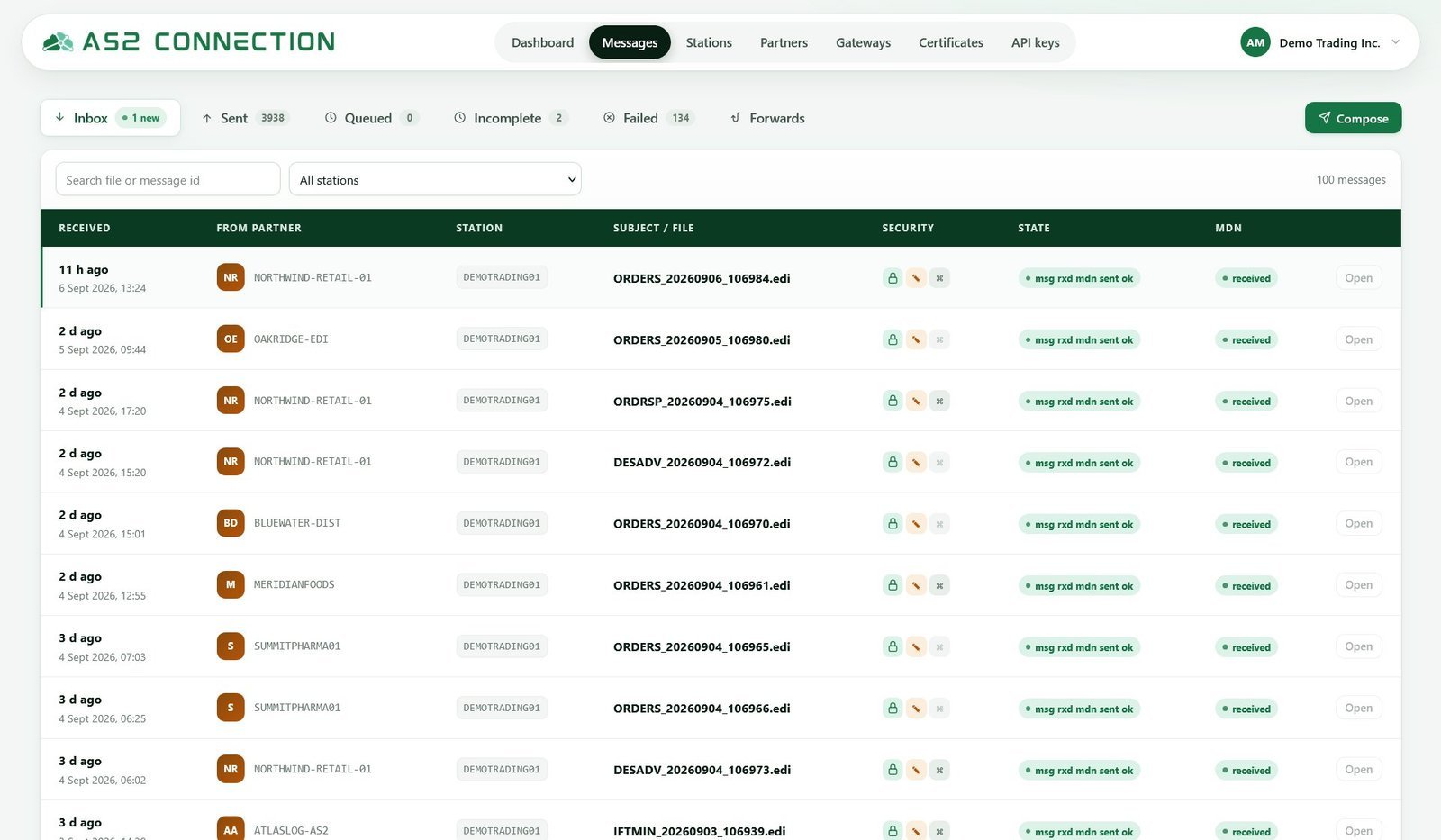
Two of those states are frequently merged, and merging them costs hours. “Sent” and “acknowledged” are different facts, and only the second involves the partner at all. Keeping them apart is what makes AS2 connection troubleshooting a five-minute job instead of a conference call.
Alert on risks, not every event
High-value alerts include missing required MDNs, negative MDNs, repeated delivery failures, retry exhaustion, inbound messages that cannot be processed, queue age beyond a business threshold, certificate expiry, and a sudden volume anomaly. Send the alert to an accountable team with the partner, message ID, error category, first occurrence, and recommended next step.
Avoid alert fatigue. A transient retry that resolves can be recorded for analysis, while a purchase order lacking an MDN near a dispatch deadline needs immediate escalation.
What deserves a page and what belongs in a daily digest
Apply one rule: page someone only when a person can do something in the next hour that changes the business outcome. Everything else is a digest item, reviewed once a day by the team that owns the flow.
- Page — your own endpoint is unreachable, so nothing can be received; inbound documents from a high-volume partner have stopped entirely; retry exhaustion on a document with a cut-off today; a negative MDN on a deadline-bound flow.
- Digest — retries that eventually succeeded; a certificate expiring in three weeks; volume above or below the usual range with no failures; a single message with a late acknowledgment on a flow with no same-day deadline.
Certificate expiry moves between the two: it belongs in the digest while renewal can still be arranged in business hours, and becomes a page once the remaining window is shorter than the partner’s change process.
The document that was expected and never arrived
This is the hardest alert in AS2 monitoring and the most valuable, because nothing failed. There is no error, no negative MDN and no failed delivery to catch — only an absence, and an absence has to be inferred from an expectation you defined in advance.
Two kinds of expectation are worth building. A schedule expectation says a partner sends a document type inside a known window: orders on weekday mornings, a remittance file on the last working day of the month. A sequence expectation says one document should follow another: a dispatch advice after an order, an invoice after a dispatch advice. Sequence expectations are stronger, because they come out of your own data rather than a calendar someone has to maintain.
False positives kill this alert, so build the windows from history rather than from what the partner says it does. Exclude non-working days, require the absence to persist for a grace period before it fires, and suppress it during agreed maintenance. Start with the two or three flows whose absence costs money, watch the first two weeks, and widen any window that fires without a real cause. An alert nobody believes is worse than no alert.
Make transaction evidence searchable
For every exchange, retain the partner profile reference, original payload or protected reference, AS2 headers, encryption/signature outcome, MDN, attempt history, and related EDI acknowledgment. Apply role-based access and retention rules appropriate to your data. The goal is to solve a partner inquiry in minutes, not reconstruct it from server logs and inboxes.
Two decisions make that real. The first is how long evidence stays searchable rather than merely backed up: an archive that takes a day to restore will not answer a partner asking about last Tuesday. The second is what you must produce for one message on request — the AS2 headers with its Message-ID and both identifiers, whether it was signed and encrypted and with which algorithms, the signed MDN with its MIC, every delivery attempt with timestamps, the certificate used, and the matching business acknowledgment.
Set the retention period against your own agreements and record-keeping obligations, and check what your platform actually offers. AS2Connection states its message retention period with the rest of the service terms on the pricing page; if you must hold evidence for longer, export it on a schedule rather than discovering the gap during a compliance review.
Monitor certificate lifecycle
Certificate expiration is predictable, so it should never be a surprise outage. Track the expiry date by partner and certificate purpose, alert well ahead of the agreed renewal lead time, and confirm the replacement through an end-to-end test. Read AS2 certificate expiration for the complete playbook.
From an unacknowledged message to an unacknowledged order
Transport monitoring counts messages; the business asks about orders. Nobody in customer service asks what happened to Message-ID 20260907-0912@example.com — they ask where order 4500123 is, and if answering means translating between two identifiers by hand, the answer arrives too late to matter.
Fix it at submission. Store your own document reference — the order number, the invoice number, the interchange control number — alongside the AS2 Message-ID, and index both. That single link turns the message log into something the business can query, and it makes the report that matters possible: every order sent today that has no functional acknowledgment yet, listed by partner.
Connect technical and business operations
Define who owns each alert. An IT team may own endpoint availability; an EDI team may own document validation; a business operations team may own a rejected order. The runbook should include partner contacts, duplicate-send rules, escalation limits, and evidence to collect. Build this into every profile with the trading-partner onboarding checklist.
Out-of-hours ownership and escalation
Name a person on a rota, not a team mailbox, and decide in advance what that person may do alone: resend under the agreed duplicate rule, yes; change a gateway’s algorithms or rotate a certificate mid-incident, no. Many partner support desks work business hours, so the correct action at 03:00 is often to capture the evidence, stop retries that are making things worse, and hand over a complete case at the start of the partner’s day. Write that down, including how long the first responder waits before waking the next person.
Frequently asked questions
What should an AS2 monitoring dashboard show?
Working queues rather than uptime. The useful screen lists messages needing attention — queued too long, failed, sent without a receipt, received but not delivered downstream — with the partner and state on each row, plus a certificate expiry countdown per partner. Anything that cannot lead to an action belongs in a report, not on the dashboard.
How long should I wait before alerting on a missing MDN?
It depends on the MDN mode agreed with that partner, so set the threshold per partner and let the deadline of the document itself be the real constraint. Synchronous versus asynchronous MDN explains how long a receipt may legitimately take in each mode, which is the number your alert should use.
Is a positive MDN enough to close an exception?
Only for flows where no business acknowledgment exists. A positive MDN closes the transport question and nothing beyond it, so where the partner returns a CONTRL, APERAK, 997 or 824 the exception stays open until that arrives — AS2 for EDI compliance covers the difference between the two layers of evidence.
Can AS2 monitoring tell me a partner stopped sending?
Only if you have told it what to expect, and the comparison often has to reach outside the gateway. A message log records what arrived; it has no view of an order that was never sent, so the strongest checks run against a system that already holds the business calendar — an open order list, a delivery schedule, a promotion plan. Where no such system is available, a per-partner expectation configured in the monitoring tool is the fallback, and it belongs to the team that knows the trading rhythm rather than to infrastructure on-call.
AS2Connection is intended to make managed AS2 connection status visible while your team connects that status to internal business workflows. Use AS2 integration with ERP systems to design those downstream states.

Leave a Reply