
An expired AS2 certificate can turn a healthy B2B connection into a failed one overnight. It may prevent a partner from verifying your signature, decrypting your message, or validating an MDN. Unlike many integration issues, certificate expiry is predictable, which makes it an ideal candidate for a documented prevention process.
Why renewal requires two organizations
AS2 is bilateral. Your replacement public certificate must be loaded by the partner, and you may need to import the partner’s replacement certificate in return. The work can involve different teams, change windows, test environments, and security approvals. Starting only a few days before expiry creates unnecessary risk.
The pending, active, and retired certificate lifecycle
A replacement certificate passes through three states, and most AS2 certificate expiration incidents come from skipping one. A pending certificate sits in your keystore and has been sent to partners, but nothing signs or encrypts with it yet. An active certificate is the one your station presents outbound and the one partners encrypt to. A retired certificate is no longer used for new traffic but is still held, with its private key, in the keystore.
The retired state is the one teams delete too early. Messages already on the wire when you switched over were encrypted to your old public key, and only the old private key opens them. The same goes for a late asynchronous MDN and for a partner whose gateway posts in scheduled batches hours after your cutover. Delete the old key too soon and those messages fail with a decryption-failed disposition.
Generation itself is the fast part: a key pair, a self-signed certificate carrying your subject fields, an RSA key of 2048 bits at minimum and 4096 commonly, and a validity window you choose. Everything after that is coordination.
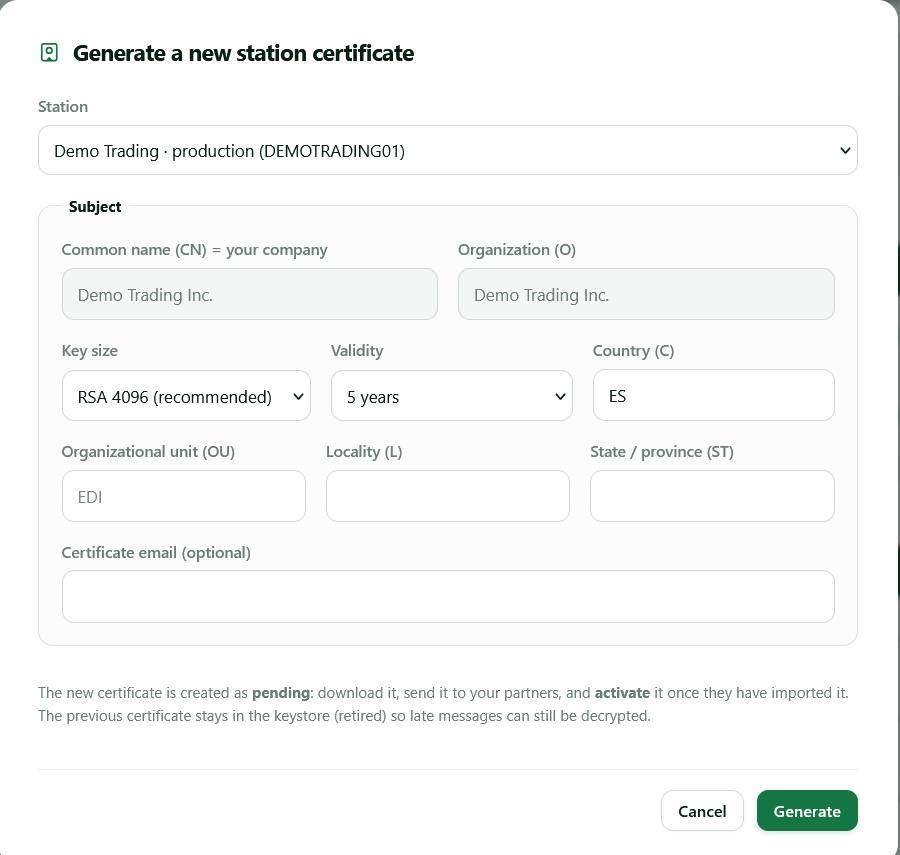
Build a certificate inventory
For every certificate, record the partner, environment, fingerprint, use (signing, encryption, or receipt verification), owner, issue date, expiry date, and planned rotation date. Make the inventory authoritative. A certificate attached to a dormant-looking partner may still be required for inbound documents.
Set at least three alerts: an early planning alert, a partner-confirmation alert, and a final escalation alert. The exact lead time depends on partner process, but weeks—not hours—are usually appropriate.
A renewal schedule that fits the partner’s change queue
"Weeks, not hours" only becomes useful when it turns into dates with names against them. The schedule below is a working default for a partner you have not rotated with before; the lead times are suggestions rather than an industry standard, and the numbers that count are the ones the partner’s own change process produces. The dates that matter are not yours — they are the ones on which somebody at the other organization opens a ticket, gets it approved, and imports a file.
| Lead time | Action | Owner |
|---|---|---|
| 90 days before expiry | Confirm the expiry date and list every partner and direction using this certificate | Integration owner |
| 60 days | Generate the replacement, keep it pending, send the public certificate and SHA-256 fingerprint with a proposed activation date | Integration owner |
| 45 days | Get written confirmation that the certificate is imported and a change window is booked | Partner technical contact |
| 30 days | Test against the partner’s test station, or agree a low-volume production window | Both sides |
| 14 days | Escalate through the commercial contact if no confirmation has arrived | Account owner |
| Activation day | Activate the new certificate, send a controlled message, verify the MDN, leave the old one retired | Integration owner |
| 30 days after activation | Remove the retired certificate once nothing has referenced it | Integration owner |
Two things stretch this timetable. Large retailers run change freezes around peak trading, so a December expiry has to be handled in October. And a partner serving thousands of suppliers batches certificate imports into a scheduled release rather than doing yours on request. Ask early and both are knowable; neither is negotiable on the expiry date.
Safe AS2 certificate rotation
- Obtain a new certificate using your approved key-management process.
- Give the partner the public certificate and fingerprint through a verified channel.
- Receive and verify the partner’s replacement certificate if applicable.
- Import each certificate into the correct test or production partner profile.
- Agree an activation date, compatibility window, and rollback contact.
- Run a controlled AS2 test and validate the expected MDN.
- Confirm production success before removing the old certificate.
Some partner configurations can temporarily trust both old and new certificates; others cannot. Never assume overlap is available. Follow the partner implementation guide and document the result in the onboarding checklist.
What AS2 certificate expiration breaks, and in which direction
AS2 certificate expiration is not symmetrical, and knowing which side fails first tells you where to look. Your certificate does two jobs: your private key signs what you send, and partners use your public key to encrypt what they send you. The partner’s certificate does the mirror image, so four separate things can break, each surfacing somewhere different. How strictly the date is applied varies between gateways, but most gateways enforce validity dates, so plan on traffic stopping on the expiry date rather than degrading gently.
- Your certificate expires in the partner’s store — outbound messages stop being accepted, and you see a negative MDN or an HTTP-level rejection naming a signature they will not trust.
- Your certificate expires and the partner encrypts to it — inbound traffic stops. Nothing appears in your log at all, which is the failure mode that goes unnoticed longest.
- The partner’s certificate expires in your store — your gateway refuses to encrypt outbound messages to it, and the failure is local, before anything leaves your network.
- The partner’s signing certificate expires — you can still receive the message, but signature verification fails and you return a negative MDN rather than a
processedone.
A negative MDN names the layer that failed rather than the certificate behind it, so read the disposition modifier before rotating anything: an expired or untrusted signing certificate usually comes back as authentication-failed. The full disposition modifier reference shows what each of the other reasons points at, and the AS2 protocol reference covers how those receipts are constructed.
With one dual-purpose certificate, all four failures land on the same date: simpler to plan, harsher when it goes wrong. With separate signing and encryption certificates the cutover is not symmetric, because the partner must hold your new encryption certificate before they next send, while switching your signing certificate only affects what you originate. Sequence the encryption side first. How AS2 certificates work covers that split in more detail.
What to do if a certificate has already expired
Pause unapproved resend attempts, determine which certificate and direction is affected, contact the partner’s technical owner, and agree the replacement process. Preserve failed message evidence and confirm duplicate-handling rules before resubmitting business documents. The AS2 troubleshooting guide helps isolate whether the error is expiry, a mismatch, or an algorithm issue.
When the partner will not confirm the new certificate
Silence from the other side is the most common reason a well-planned rotation still ends in an outage. Your renewal sits in someone else’s ticket queue, competing with their own projects, and internal urgency does not move it. Assume you will have to chase, and build the chasing into the schedule.
Send the certificate and fingerprint in writing, to a mailbox rather than a person, and ask for three specific answers: has it been imported, into which environment, and from what date. If nothing arrives by your escalation date, raise it through the commercial relationship — the supplier manager who cares about missing orders can move a technical ticket. Keep the old certificate active while you wait; cutting over unilaterally to force the issue only stops the documents.
If the date arrives anyway, record what you sent and when, then check the duplicate policy before resubmitting anything rejected — gateways commonly discard a repeat of the same Message-ID, but not all do.
Make expiration visible in operations
A managed AS2 gateway should display active certificate details by partner and connect them to transaction failures. Combine that visibility with accountable alerts and a tested runbook; no tool alone guarantees coordination.
Frequently asked questions
How long is an AS2 certificate valid?
You choose the validity window, because AS2 certificates are normally self-signed rather than issued by a public CA. One to five years covers most production use. A longer window means fewer rotations to coordinate; a shorter one limits how long a compromised key stays usable. Some partners cap what they accept in their implementation guide, so check before generating a five-year certificate.
What happens the moment an AS2 certificate expires?
Most gateways enforce the validity window, so plan on traffic stopping at the expiry timestamp rather than degrading over a grace period. How quickly anyone notices depends on the flow: an outbound run reports a failure within a message or two, while an inbound-only relationship can stay quiet for a day before someone asks where the orders are. Nothing is deleted at expiry, so recovery is an import and an activation rather than a rebuild.
Can I renew an AS2 certificate without downtime?
Yes, when both gateways can hold the old and new certificates at once and you agree an activation date. The old one stays active until that date, the new one sits pending, and after cutover the old one is retired rather than deleted so in-flight messages and late MDNs still decrypt. Where a gateway holds only one certificate per partner, expect a short coordinated switch instead.
Do I need to send the new certificate to every trading partner?
Yes. Each partner holds their own copy of your public certificate in their profile for you, and no central directory updates them. Rotating one station certificate means as many change requests as you have partners on it — which is why the inventory has to map certificates to partners and directions before you start.
Would a CA-issued certificate avoid expiration problems?
No. A CA-issued certificate still expires, usually sooner than a self-signed one, and the partner still has to import it into your profile, because AS2 trust comes from that explicit import rather than from a public chain. Use a CA-issued certificate when a partner’s implementation guide requires it, not as a way to avoid the rotation work.
AS2Connection offers a managed AS2 connection model for teams that want centralized partner operations. Pair it with AS2 transaction monitoring so upcoming risks and live message outcomes are reviewed together.

Leave a Reply